
SIL rent and board calculator and roster costing for every house
Know what a change costs before the office approves it.
Know what a change costs before the office approves it
A house lead notices that two residents are awake most nights and asks to move from a sleepover to active overnight staff. The main office wants to know what that does to wages, to each resident's support charges and to their SIL funding. Someone opens a spreadsheet, someone else rings the house, and a week later finance is still asking which date it starts.
The SIL House Costing Suite keeps that whole conversation in one place for each house. The house enters its roster once, tries the change, and sends the office a dated report that explains what changes, from when, why and what it does to the numbers. The same app holds each resident's rent and board schedule and tracks every change through to billing.
What it does
You pick a house and the first screen tells you what needs attention there: a schedule waiting for review, a resident who needs checking after indexation, a roster change the office hasn't decided on, a billing update finance hasn't confirmed. Each line opens the work itself.
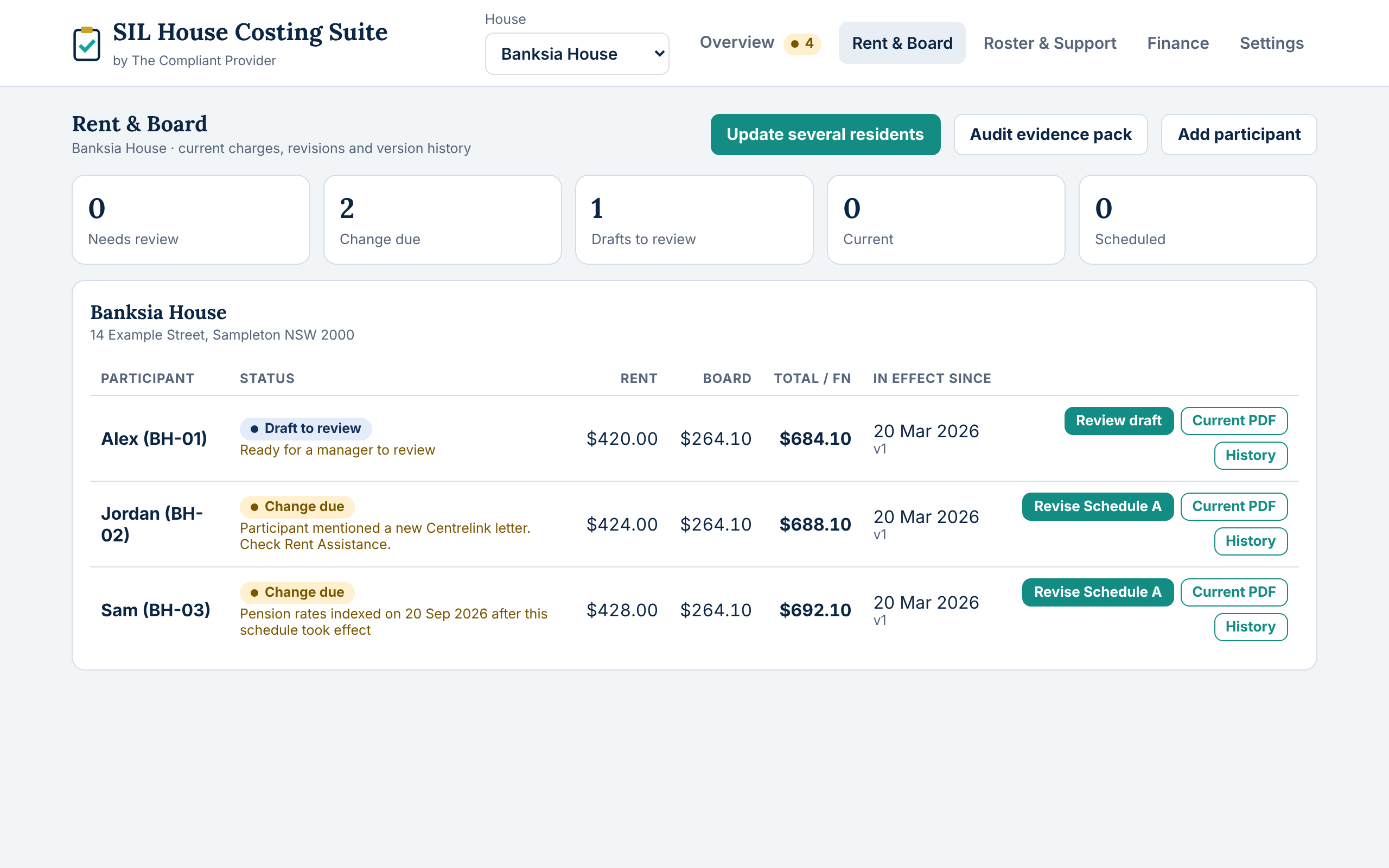
Rent & Board works out what each resident pays from the calculation your agreement uses, then issues a revised Schedule A when a payment changes. On pension indexation day you enter the new Centrelink rates once and the app prepares a draft for every resident it affects, flagging anyone whose amounts don't match so nobody is marked current by mistake. Every version is kept in the resident's record with who prepared it, who reviewed it and when it was sent, and the audit evidence pack pulls those records together for any date range.
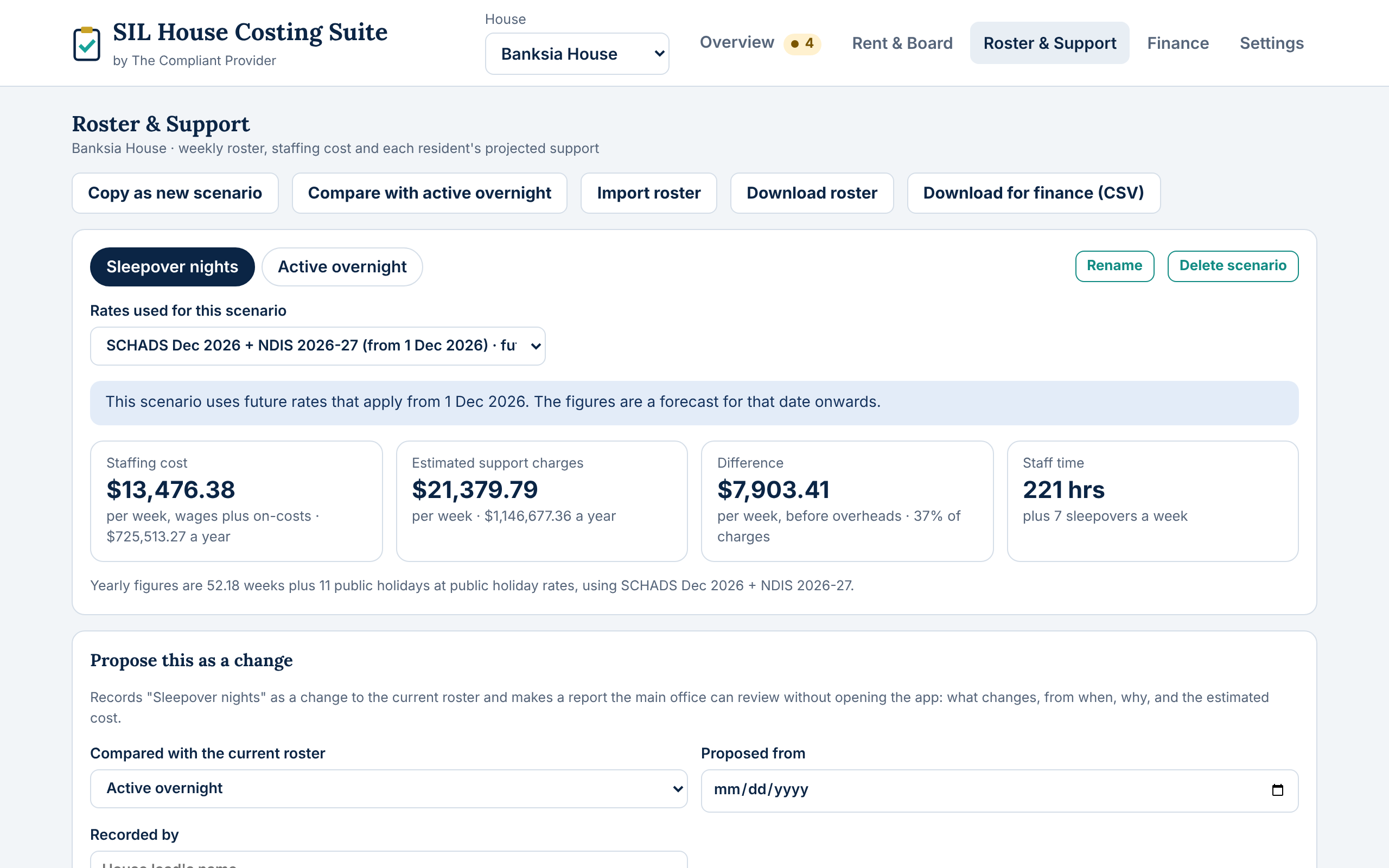
Roster & Support takes the house's weekly roster, typed in or imported from a CSV export of your rostering system. It estimates the staffing cost from SCHADS pay rates and your on-costs, and each resident's support charges from the NDIS price limits or your own agreed rates, including shifts shared by some residents and 1:1 time. Enter each resident's SIL funding and you can see their projected use over a year, public holidays included. Rates are kept as dated sets, so you can rerun the same roster on next year's rates when Fair Work or the NDIA publishes them.
Finance shows what is ready to hand over, exports old and new amounts with the dates each applies, and records when billing was updated.
See a roster change report
The free version comes with a sample house of three residents, Banksia House, so you can try the whole thing before you buy. Its current roster uses a sleepover every night. Copy it, switch the nights to active overnight staff, and record it as a change proposed from 1 December with the reason.
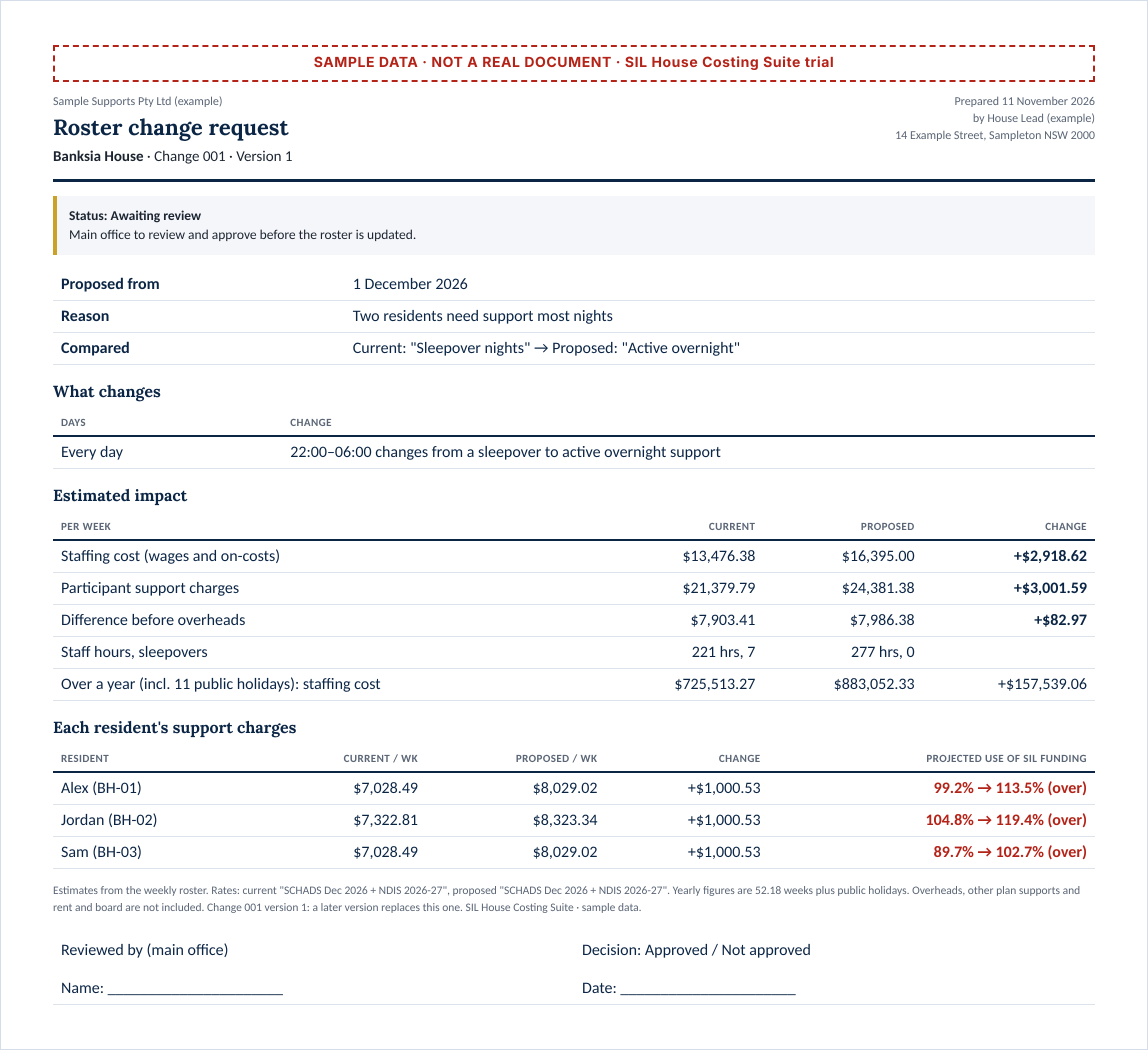
The report that comes out reads "Banksia House · Change 001 · Version 1" and opens with its status: awaiting review, with the main office to approve before the roster is updated. It describes the change in words, every day from 22:00 to 06:00 moving from a sleepover to active overnight support, then shows the estimated impact in the sample: about $2,919 a week more in staffing cost and about $3,002 a week more in support charges. Each resident's charges and projected funding use sit underneath, with a line for the office to sign.
The house can print it or save it as a PDF without an internet connection and send it the way it already sends things to the office. If the roster is edited after that, the next export becomes Version 2, so the office always knows which copy is current.
Sample data and the app's built-in rates. It shows how the report works, not what your house will cost.
Plans
Starter
Team
No sign-up. Opens in your browser.
After purchase, email support@thecompliantprovider.com with the business name to show on your licence, and your key will arrive within one business day.
What your licence includes
Your licence runs for 12 months from the date you buy it. During that time you receive every update to the SIL House Costing Suite, including a rate file with new SCHADS pay rates and NDIS price limits, published within 14 days of Fair Work or the NDIA releasing them. You add it in Roster & Support with Import rate file, or enter new rates yourself at any time. The website version updates itself the next time you open it online. If you use the downloaded file, we email you new versions. Support is by email at support@thecompliantprovider.com, and we reply within two business days, Monday to Friday, during Australian business hours.
How your records are kept
The suite saves your houses, residents, schedules and rosters on the device you use it on. Nothing is sent to us or to an online server. Each device keeps its own records, so a house lead's laptop and the main office computer each hold their own copy. Houses share a change by exporting the change report or roster file and sending it through your usual email or Teams process. The suite is not a shared online dashboard. Download an encrypted backup after each round of updates, because we can't recover records lost from a device.
Estimates and responsibility
Staffing costs, support charges and funding use are estimates based on the roster and rates you enter. They are not financial, legal or payroll advice. You remain responsible for your rent and board charges, Schedule A documents and NDIS claims.
Refunds
We don't offer refunds for change of mind, so please try the free sample version first. This doesn't affect your rights under the Australian Consumer Law.
Questions
Do I need the internet?
Only the first time you open it. After that it works offline, and reports can be printed or saved as PDF without a connection.
Can several staff use it at once?
Each device keeps its own records. A house lead and the main office can each use it and send change reports and roster files between them. A shared online workspace isn't part of this version.
Which browser should I use?
Chrome or Edge on a Windows or Mac computer.
Can I bring in our roster from ShiftCare, Brevity or a spreadsheet?
Yes, from a CSV export with the shift date, start and finish times, client and staff member. You check how the columns were read before anything is imported, and any shift whose client the app can't match stays unallocated until you choose who received the support.
What happens when my licence ends?
Everything keeps working for 14 days. After that you can still open, print and back up your records, and a renewed key brings back everything else.
Does my data go anywhere?
No. It stays in the browser on your device, and backups are encrypted with a password you choose.
Who built it?
The Compliant Provider works with NDIS providers on compliance documentation, audit preparation and the systems behind them. The suite's records were designed around the questions providers are asked about charges and changes: how an amount was worked out, who checked it, when the resident was told and when billing changed.