Staff & client documents · Excel

NDIS staff and client compliance tracker template for Excel

See which recorded document requirements are complete and which need attention, what is expiring soon, and who you need to chase, with the follow-up email already drafted.

A$49 one-timeGet the tracker

Instant download · Microsoft Excel 2021 or Microsoft 365 · Blank workbook, demo workbook and user guide
Staff & Client Compliance Tracker PRO

What the tracker does

One workbook for every documentStaff, client, contractor and supplier documents in one place.
Expiry and review flagsSee what is expired, expiring soon or due for review without checking every record.
Missing documents and signaturesOutstanding requirements show automatically for each person.
Live chase queueA list of who to follow up and for which documents.
Follow-up email draftsThe tracker drafts a follow-up email listing the documents needed. Review, copy and send it from your own email.
Your own requirementsEdit the requirement lists to match your roles and services. Reporting formulas are protected so they keep working.

See it in action

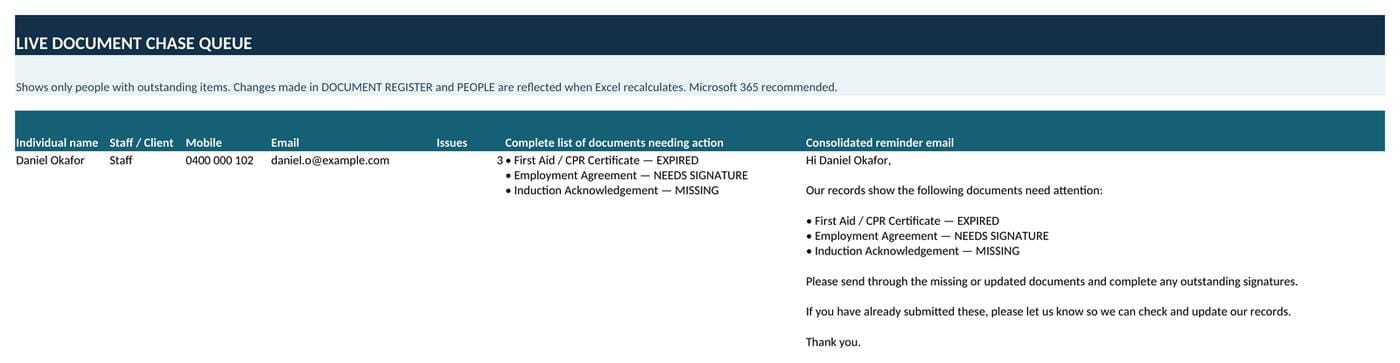
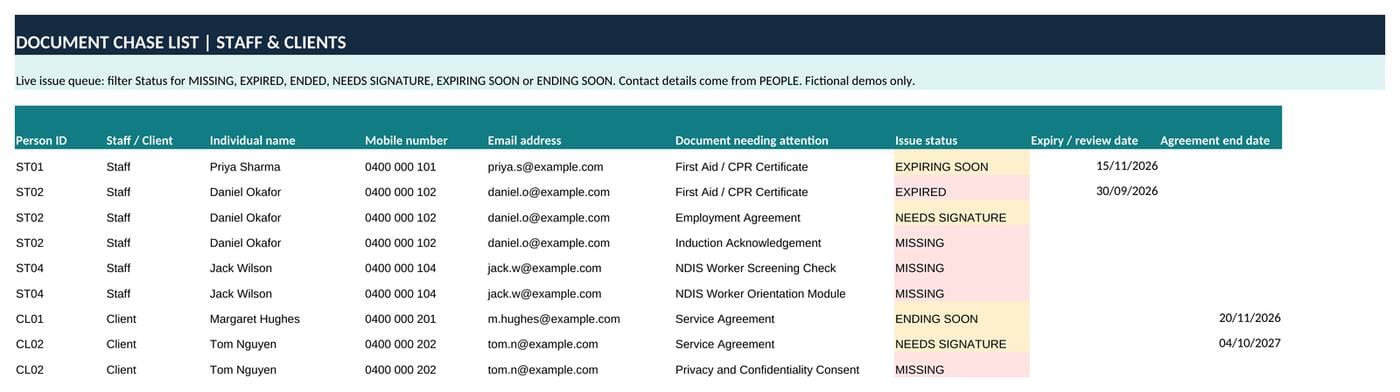
These screens come straight from the workbook, filled with fictional demo staff and clients. The dashboard flags who needs attention, the chase list shows each missing or expiring document, and the chase queue drafts one reminder email per person.
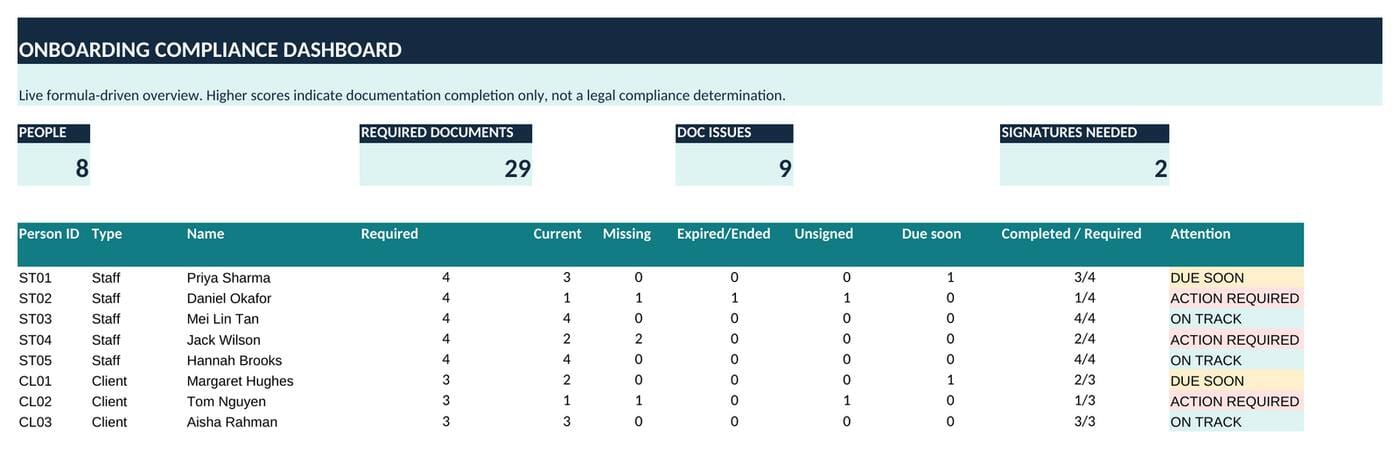
Staff and client compliance tracker dashboard showing totals for people, required documents, document issues and signatures needed, with each person marked on track, due soon or action required
The dashboard: each person’s completed documents against what’s required, and who needs attention.
Document chase list showing each missing, expired, unsigned or expiring document with the person’s contact details and dates
The document chase list: every document that is missing, expired, unsigned or due soon, with contact details ready.
Chase queue showing one staff member with three outstanding documents and a drafted reminder email listing them
The chase queue: one reminder email per person, listing everything they still need to send or sign.

Demo data only. The drafted email updates when Excel recalculates, and works best in Microsoft 365.

Who it’s for

  • NDIS providers and support coordinators
  • Disability support and aged care businesses
  • HR and compliance coordinators preparing staff files for audit
  • Small businesses managing employee and contractor documents

What it isn’t

It’s an administrative tracking tool. It doesn’t verify worker screening clearances for you or guarantee audit outcomes. Always check clearances with the relevant screening unit.

Need a full set of quality registers too? See QMS Register PRO.

Preparing for audit? Get the whole kit.

This tracker plus QMS Register PRO and the Internal Audit Self-Assessment Tool: A$99, A$48 less than buying them separately.

See the Audit-Ready Bundle

Common questions

What is included in the download?

A blank tracker for your own records, a demo workbook with example data, and a user guide (PDF).

What software do I need?

Microsoft Excel on a computer.

Can I change the document requirements?

Yes. The requirement lists are editable, so you can match them to your roles, services and state rules.

Does it send emails for me?

No. It drafts the follow-up email text. You review it, copy it and send it from your own email app.

Is it a subscription?

No. You pay once and keep the file.

What if the file doesn’t work?

Email support@thecompliantprovider.com. If a file is faulty or not as described, we’ll fix it, replace it or refund you. We don’t give refunds for change of mind.

A$49 one-timeGet the tracker
Built from real audit preparationMade by a compliance specialist who prepares registered NDIS providers for Core Module and SIL audits.
Pay once, keep itOne-time purchase, no subscription. Secure checkout through Payhip.
Email supportQuestions or problems: support@thecompliantprovider.com
© 2026 The Compliant Provider · Contact · support@thecompliantprovider.com · Privacy policy

Templates and resources are provided for general administrative purposes and do not provide legal advice or guarantee regulatory compliance. Australian NDIS resources are designed with the Australian provider environment in mind. International customers must review and adapt all documents to meet their local laws, regulations and organisational policies.